
2x6 single strip
Use this format when you want one finished vertical photo booth strip for sharing, downloading, or placing into a larger design.
The standard photo booth strip size is 2x6 inches. Use this guide to choose the right pixel size, DPI, aspect ratio, and 4x6 print layout before you download or print your strip.
| Resolution | 2x6 strip pixels | Best use |
|---|---|---|
| 150 DPI | 300 x 900 px | Quick drafts and small previews |
| 200 DPI | 400 x 1200 px | Acceptable home printing |
| 300 DPI | 600 x 1800 px | Recommended print quality |
| 600 DPI | 1200 x 3600 px | High-resolution archival exports |
Use this format when you want one finished vertical photo booth strip for sharing, downloading, or placing into a larger design.
A standard 4x6 photo print can hold two 2x6 strips side by side. Print once, then cut down the center.
Keep the strip proportion at 1:3 to avoid stretching faces, cropping frame borders, or creating print margins that do not align.
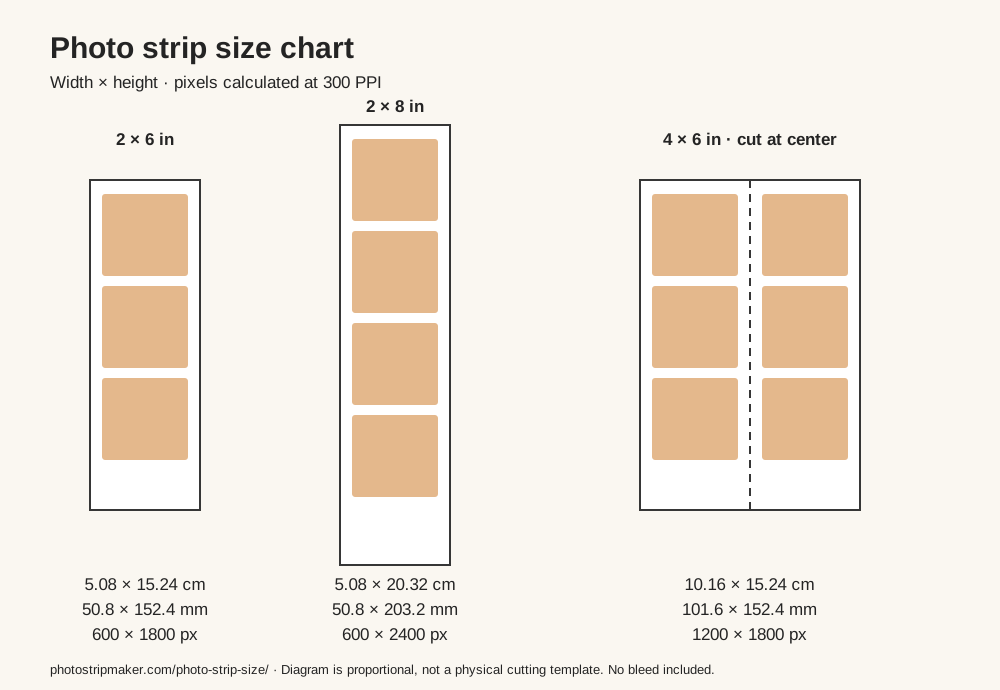
A 2x6 inch strip is the most recognizable photo booth format, but it is not the only size you may need while preparing artwork. Some booth designs use a taller 2x8 inch strip for extra frames, while most home printers and photo labs expect a 4x6 inch file. The safest workflow is to design the strip at the correct ratio first and check the pixel dimensions before placing two 2x6 strips onto a 4x6 print sheet. A 2x8 strip needs a sheet at least 8 inches long; it will not fit at full size on 4x6 paper.
| Format | Centimeters | Millimeters | Pixels at 300 PPI | Ratio | Best use |
|---|---|---|---|---|---|
| 2 x 6 in | 5.08 x 15.24 cm | 50.8 x 152.4 mm | 600 x 1800 px | 1:3 | Classic single photo booth strip for sharing, scrapbooks, and event favors. |
| 2 x 8 in | 5.08 x 20.32 cm | 50.8 x 203.2 mm | 600 x 2400 px | 1:4 | Longer booth strips with extra frames, captions, or a larger event title. |
| 4 x 6 in | 10.16 x 15.24 cm | 101.6 x 152.4 mm | 1200 x 1800 px | 2:3 | A standard print sheet that can hold two 2x6 strips side by side. |
Pixel dimensions equal inches multiplied by pixels per inch (PPI). Print guides often call this 300 DPI, although DPI describes printer dots. Changing a file's resolution label alone does not add detail. A 600 x 1800 image produces a 2x6 inch print at 300 PPI; a 300 x 900 image has only 150 PPI at the same physical size.
Keep faces, dates, logos, and captions away from the outer edge of the strip. A small safe area helps protect important details when a home printer shifts the paper slightly or when a 4x6 lab print is cut by hand. If your design has a border, leave it wide enough that a tiny trimming difference still looks intentional instead of uneven.
For a 2x6 print, use 600 x 1800 pixels at 300 DPI as the practical target. When placing two strips on a 4x6 canvas, each strip can sit side by side with a center cut line. Avoid resizing only the width or only the height after export, because that changes the 1:3 ratio and can stretch faces.
Bleed extends the background outside the finished cut; a safe area keeps important content inside it. If your printer asks for 0.125 inch bleed on every edge, a 2x6 design becomes 2.25 x 6.25 inches (675 x 1875 pixels at 300 PPI). As a starting point, keep text and faces at least 0.125 inch inside the trim edge, about 38 pixels at 300 PPI. Follow your printer's actual specification. Two full-width strips on 4x6 paper leave no room for additional outer bleed or a cutting gutter.
If you move the finished strip into Canva or another design app, create a custom 2x6 inch canvas or use 600 x 1800 pixels for a 300 DPI layout. For a photo lab order, place two 2x6 strips on a 4x6 inch canvas and export a high-quality PNG or JPG. That format is easier to upload to common print services because 4x6 is a standard photo product.
Phone photos are usually large enough for photo booth strips, but cropping matters. Choose images with enough space above the head and around the sides, then use the editor crop controls before downloading. This keeps each frame readable after the strip is printed small.
For a taller Canva design, use 600 x 2400 pixels for 2x8. For two 2x6 strips together, use a portrait 1200 x 1800 pixel canvas and place each 600-pixel-wide strip beside the other. Check the exported file dimensions; enlarging a small download does not recover missing detail. See Canva's size and resize guidance for its current controls.
At home, select the matching paper size and print at 100% or actual size. Disable automatic fit-to-page scaling when you need exact dimensions. Borderless modes can enlarge and crop the image, so print one test sheet and measure the result before making a batch. If your printer cannot print to the edge, use a larger sheet and trim to size.
Walgreens and CVS Photo list 4x6 photo prints. To prepare a pair of strips, upload a single 4x6 layout containing both 2x6 designs. Inspect the order preview for cropping and orientation, and plan to cut the print yourself. Check current options with the chosen store; a 4x6 print order does not by itself specify a booth-style center cut.
Choose a photo strip template, then follow the step-by-step printing guide.
A classic photo booth strip is commonly 2x6 inches, or 5.08 x 15.24 cm (50.8 x 152.4 mm). Other layouts use different proportions.
Use 600 x 1800 pixels for a 2x6 inch print at 300 PPI, often called 300 DPI in print settings.
Not at its original size. Choose larger paper, or reduce it proportionally to 1.5 x 6 inches. Cropping it to 2x6 removes part of the design.